 hashcat online
 Hashcat password cracking hardware
This document is primarily for people who have fallen in love with password cracking and are ready to take their relationship to the next level. If you are new to hashing, please don't be discouraged by this document! While you really shouldn't crack a password on a laptop or low/mid-range desktop, or even a HEDT with insufficient power/cooling, this might be all you have available for the first time, and that's okay! As a beginner, these systems can be learned as long as you maintain a light workload (or ) and a fairly short run time (up to 30 minutes - 1 hour). This document will be more valuable to you when you start learning ropes and you will want to satisfy your desire for faster speeds. Until then, use what you have and enjoy learning to the fullest! hashcat -w 1hashcat -w 2
The Unsuitable Tool for the Job
Password cracking is undoubtedly the most brutal amount of work you can put on your computer—it definitely doesn't put any strain on your computer hardware like a password. Cracking certainly does. So while it's technically possible to crack passwords on almost any device using a processor, you can use them on many devices you probably shouldn't try to crack, such as your phone, Tesla's infotainment system, or casino ATMs. Attempting to crack passwords on systems that are not designed to handle continuous computing workloads for extended periods of time will undoubtedly ensure their premature demise. So if you manage to get Hashcat running on your Nintendo Switch, be well prepared to buy a new Nintendo Switch tomorrow.
It is generally not recommended to crack passwords on a laptop. Most laptops do not have a separate GPU, but rather an integrated GPU or an APU. Most laptops with discrete GPUs do not have adequate cooling for computing workloads because the GPU and CPU typically share a common heat pipe and heat sink. If you happen to own an ultra-high-end "desktop replacement laptop" or a "mobile workstation" with a desktop-grade GPU, then you may actually have discrete hotspots for your GPU and CPU, so you may actually be able to get rid of the laptop crash. For example, I have a Clevo P650HP with a GTX 1060 and a Dell Precision 7530 with a Quadro P4200, both of which can actually handle a full compute workload () for a moderate duration (but not without burning my fingers when I touch the keyboard). However, don't expect even the highest-end mobile workstations to achieve amazing speeds, as these devices are still relatively low-power devices (< 200W), and performance reflects this. hashcat -w 3
Cracking your password on your current desktop may also be undesirable. Low/mid-range desktops typically have integrated GPUs, APUs, or low-end power budget GPUs that simply cannot handle compute workloads. Even high-end gaming desktops may not have enough GPU or chassis cooling for cryptographic workloads. If you notice your temperature spiking above 90°C, it's time to empty your wallet.
Finally, while GPU mining rigs are technically designed for dedicated compute workloads (but only in the narrowest definition), they often break almost all the rules when building dedicated Cracking rigs. These RIGs are designed to hash individual targets and require the absolute minimum amount of hardware to minimize operational overhead and maximize profits. This is the exact opposite of the password cracking device you want. While you can use GPU mining equipment to handle some password cracking workloads, and you might post some exciting numbers, you'll eventually run into problems when trying to do anything interesting or worthwhile. If you already have the hardware, you might as well use it until you start hitting a wall. Otherwise, please don't rush to buy a Milkcrate miner from eBay. hashcat -b
The right tool for the job
Building a suitable password cracking tool is far more than just stuffing a bunch of GPUs into a computer and then calling it a day. Imagine running the most evil stress test ever performed on your system, then running it continuously for days/weeks/months—well, that's password cracking. Power consumption and heat dissipation are the main demons you have to fight, but in reality, all the components you choose for your equipment must be balanced and well thought out. Seriously. If you want to do this right, there are very few (if any) corners you can cut.
Power Delivery
Power supply is a critical aspect of building a cryptographic device. You must understand some basic electrical concepts ( ) and be able to perform some basic mathematical calculations, because if you get this part wrong... ideally, you will pop up a circuit breaker; In the worst-case scenario, you start a fire that causes property damage, injury, or even death. W = V × A × PF
Make sure the power outlet you plug your device into can support the amount of power your device will consume. Most modern residential circuits are only 15 or 20 amps (110V), and you shouldn't put more than 80% of the load on the circuit (for example, a 12A circuit is 15A, a 16A circuit is 16A, and a 20A circuit is 16A). Depending on the number of GPUs you have, your device may draw much more current than that. And your equipment may not be the only thing drawing energy on the circuit (you'll be competing with lighting, microwaves, Hitachi, etc.).
Also, pay attention to the power factor of the power supply. Your power supply's job is to convert alternating current from the wall into usable direct current, and it cannot do this with perfect efficiency. Power supplies are most efficient at 50% load (typically 85% - 95%), and are typically only 80% - 92% efficient at 100% load. Let's say you have a rig with four RTX 2080s with a total component power consumption of 1320W, but your power supply is only 85% efficient at 100% load:
1320W active power ÷ 0.85 power factor ≈ 1553W apparent power
While your total component power consumption may only be 1320W (active power), due to the power supply's power factor, you're actually drawing more power from the 1550W outlet (apparent power). This doesn't seem like a big deal until you do the math and realize that while a 15A 110V circuit can support 1320W, it cannot safely support 1550W. Similarly, it's important to understand that the power supply's rating is the wattage it can deliver to your components—it's an output rating, not If you have a 1600W power supply, the power factor at full load is 87%, and your power supply is actually able to draw 1839W of power from the outlet. You can learn more about the power factor and efficiency of the power supply under various loads on the 80 Plus certification website.
Regarding the power supply, make sure you are using a quality power supply that will provide the power your system needs. You may need more than one power supply, depending on the number of GPUs and other components in your equipment, especially if you have a power-hungry CPU like the AMD Threadripper. Your power supply should be at least 80 Plus Gold, and ideally should be able to power 120% - 200% of the entire system under load. Remember that power supplies are most efficient (with the highest power factor) when they are in the 20% - 50% load range.
Also - this is very important - Do not buy or use cheap or undersized power supplies. I'll say it again, because it's absolutely crucial: Don't use cheap or undersized power supplies in password cracking equipment. You will light a fire. A real fucking fire, Craig. A flame of fire. Real flames. The kind that burns.In some areas, you can cut corners to save costs in your password cracking equipment, but power supplies absolutely cannot be an area that makes you cheap.
Finally, make sure that the power cord you are using is of adequate specifications. Most power supplies—even those capable of delivering >1000 watts—come with fragile 18 AWG C13 power cords that can quickly overheat and melt. You may need at least a 16 AWG power cord, and if you have a huge 1500W+ power supply, a 14 AWG power cord is required.
Chassis and cooling
The chassis, also known as the shell, is the foundation of your build. The chassis you choose for your rig must be large enough to accommodate the hardware you plan to install, while also supporting an appropriate number of power supplies and providing a smooth, straight-path positive airflow for Strong. Most mid-tower ATX chassis can only support 2 or 3 GPUs, while full-tower and super-tower EATX/SSI-EEB chassis can support 4 or 5 GPUs. Dedicated server chassis can accommodate multiple power supplies and support 8, 10, 16, or even 20 (single-width) GPUs.
It’s almost certain that the backup fans that come with your chassis will be severely inadequate to accommodate the heat generated by your rig (with a few exceptions. But pretend they don’t. You’ll need to replace your stock fans with high-CFM, high-static-pressure ones. Delta and San Ace are good options, but be aware that some of these fans can draw up to 75W each. Also, these fans can be very loud, which may bother some people. Water cooling may be a suitable alternative in some cases.
If you want to win easily when it comes to chassis selection, both Tyan and Supermicro offer server quasi-systems designed specifically for GPGPU computing (buyer warning: many of these chassis are designed for low-power, passively cooled server GPUs, such as the NVIDIA Tesla, and cannot accommodate desktop GPUs.
Graphics Processing Units (GPUs)
If you're n00b, you might be wondering why we keep talking about graphics cards when we're not talking about games or graphics. Or maybe you already know that GPUs are used for password cracking, but don't really understand why. Well, password cracking is the so-called awkward parallel problem (there is little effort required to break the problem down into multiple parallel tasks), so the password cracking workload is parallelized. This means that the more processors we have handling the problem, the shorter the time it takes to wait for the task to complete. Your CPU may already have between 4 and 16 cores, and may be able to support 8 to 32 execution threads through synchronous multithreading (SMT, also known as hyperthreading). With Single Instruction Multiple Data (SIMD) instructions, you can perform 16 to 256 calculations simultaneously. This may seem like a lot, but you're right—it really is! Or at least that's how it would be, if it weren't for the fact that GPUs have a bunch of cores. Modern high-end GPUs can have between 2560 and 5120 cores. Although they are slower and have limited capabilities compared to the cores in the CPU, they are sufficient to make the GPU 100+ times faster than the CPU for cryptographic workloads. Performance also scales linearly with each GPU you add to your rig! Therefore, if you have 10× RTX 2080 Ti in your device, you will have an orgasmic 43,520 GPU cores at your disposal, never pushing any pixels.
To better understand this concept, here is an illustrative example:
Suppose you own a 19th-century pudding factory (before the Industrial Revolution). Making a delicious banana pudding requires tons of bananas, but all of them must be peeled first (an embarrassing parallel problem). You and your five business partners (a multi-core CPU) are truly smart businessmen and fully capable of peeling bananas; In fact, you know the best way to peel bananas, and can make complicated bananas - relevant decisions. But the six of you can't peel many bananas a day. Even if you remove one banana per hand (SMT) or four bananas per hand (SIMD), it still takes many weeks to peel all the bananas. Too many damn bananas! So you decide to recruit and train 10,000 employee monkeys (GPUs) to peel bananas for you. Monkeys are neither very fast nor very intelligent; Why are they making banana pudding and running a factory! However, with 10,000 users working simultaneously, they can certainly peel some bananas—in fact, they can peel them all in one morning! If you give monkeys cocaine* (overclocking), they can work faster. But be careful, as sometimes the monkey overheats, collapses from exhaustion (falls off the bus), or stops listening to commands altogether (the ASIC hangs).
* Legal Disclaimer: Do not administer cocaine to 10,000 monkeys without adequate cooling.
This example clearly shows why we use GPUs to crack passwords. If not, it should at least provide enough justification for staffing your Victorian pudding factory with frantic monkeys.
So which GPU should you use in your rig? Well, once upon a time ATi / AMD reigned supreme in the password cracking world. With more cores than NVIDIA plus special hardware instructions (BIT_ALIGN and BFI_INT) that enabled them to reduce the number of instructions needed to calculate a hash value, ATi / AMD GPUs were easily 4× faster than their rivals. But NVIDIA stole the crown from AMD back in 2014 with the release of their Maxwell architecture (GTX 900 series) and AMD have yet to win it back (and quite likely never will.) So you unequivocally will want to use modern NVIDIA GPUs in your rig.
But which NVIDIA GPUs, you ask? Great question! You want to use desktop GPUs (GTX / RTX), not workstation (Quadro) or server (Tesla) GPUs, even if you are using a server chassis. Why, you ask? You sure do ask a lot of questions. You know I'm not getting paid for this, right? They literally have me chained to a desk in a musty basement, forcing me to write all this for you on an Eee PC 700. I haven't eaten in a month and I defecate through a hole in the chair. Please send help. Oh shit, they're coming; be cool, you know nothing. *Types out loud* ... HAPPY TO ... ANSWER ... T H A T Q E S T I O N ... F O R ... Y O U... Right, so, first reason is that desktop GPUs are an order of magnitude or two less expensive, as desktop GPUs are subsidized by gamers and you have an economy of scale working in your favor. Workstation and server GPUs also have features that you'll never use for password cracking (such as FP64 performance), so you're paying extra for basically nothing. If you're really into giving away assloads of money for absolutely nothing in return, I will happily give you my ACH info. Second, workstation and server GPUs are traditionally slightly slower than desktop GPUs for password cracking workloads. There have been some recent exceptions to this — chiefly the Tesla P100 and V100 — but even though they're faster they cost more than a human liver. We typically measure a GPU's value in terms of performance per dollar and performance per watt. Pick your most-used algorithm (if you're in a corp environment this will likely be NTLM) and divide the hashrate of the GPU by how much it costs. You will see the perf:dollar ratio for Titan, Quadro, and Tesla GPUs are abysmally low, while flagship desktop GPUs (model numbers ending in "80") have the best perf:dollar ratios. Similarly, steer clear of mid-range and low-end GPUs. While the price tag may look attractive, their perf:dollar ratios reveal they're a waste of money.
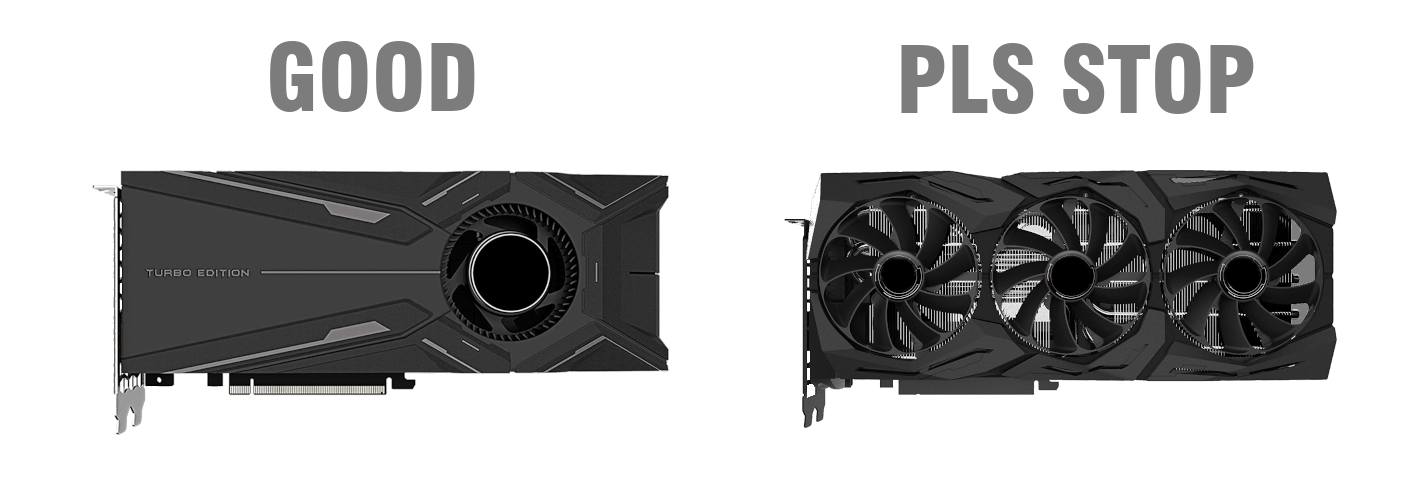
So you now know to buy high-end NVIDIA desktop GPUs with the highest perf:dollar ratios, but there's still one critical piece of information I haven't yet told you, so DELETE THAT GPU FROM YOUR NEWEGG CART, CRAIG. FUCK. You need to buy GPUs with a blower-style fan and a heatsink with horizontal fins. Do NOT buy GPUs with axial fans and a heatsink with vertical fins. Just because a GPU has two or three fans does NOT mean it will have better cooling than a GPU with a single blower fan — quite the opposite is true. Those flashy multiple-fan GPU coolers actually vent hot air into your chassis rather than out of it, and are designed to handle "bursty" workloads (like gaming) and absolutely cannot cope with sustained compute workloads. Simply put:
Central Processing Units (CPU)
First and foremost, your CPU selection will be primarily driven by your motherboard selection. So pick your motherboard first. There's not even much to say about that, and that's why motherboard doesn't have its own section. Get what supports you need, it's as simple as that. Many people mistakenly believe that if you intend to crack only GPUs, it doesn't matter what CPU is installed in the cracking device. This mentality stems primarily from the mining community, where you want to buy the cheapest, worst-case CPUs to keep infrastructure costs low. But cryptographic cracking is not mining. That's fucking not it, CRAIG. I don't care what you see on REDDIT. Although the CPU you choose will be largely determined by your choice of motherboard, there are still some rules to follow.
In general, your CPU needs N + 2 threads available for GPU hacking, where N is the number of GPUs in the equipment. For example, if you have an 8-GPU rig, your CPU needs to be able to support 10 threads. Quad-core CPUs with synchronous multithreading (SMT, such as Intel) only support 8 threads, which can leave you somewhat short on resources; A six-core CPU with SMT would be more suitable.
If you are using a dual-slot motherboard, note whether your motherboard is Single Root Complex or Dual Root Complex. A single-root complex means that all GPUs route through a single CPU, while a dual-root complex means that half of the GPUs route through one CPU and the other half through a second CPU. If your board is Single Root Complex, this usually means that as long as you have enough threads, you can install only one CPU to support the number of GPUs.
Also, remember that while you might think you only know how to do GPU hacking, you certainly won't. Some algorithms are not suitable for GPU acceleration, and you will need to use the CPU. Even if the algorithm is suitable for GPU acceleration, the attack may still be more effective on the CPU (for example, a direct dictionary attack against a fast hash algorithm, or against a hash list with hundreds of millions of hashes). You will also need to do things like wordlist operations, rule set generation, potfile parsing, etc., and you don't want the CPU to be too slow for these tasks.
Finally, let's talk about branding. Again, it largely depends on the motherboard you choose. However, if you have a choice, choose AMD. Intel has been for a long time, but AMD is finally competitive again for the first time since 2006, and they absolutely crushed it with EPYC, Threadripper, and Ryzen. If you need help choosing a CPU, check out Passmark's premium CPU and CPU value charts. Personally, I wouldn't consider not buying anything with a CPU Mark score below 15,000.
Ram
This also largely depends on the motherboard you choose, but you need to follow two hard rules:
Rule #0: You need at least twice as much host memory as video memory.
Host RAM ≥ 2 × VRAM
Therefore, if you have 8 x RTX 2080 SUPER, each with 8GB of VRAM, then you need at least 64GB of Host memory. You may be able to spend a little less time on while, but when you start doing something more advanced, you will receive a CL_OUT_OF_HOST_MEMORY error.
Rule #1: Always buy reputable name brand RAM. Don't buy cheap RAM. Do not purchase non-branded RAM. Do not purchase refurbished RAM. Do not buy the Ram truck. Don't buy literal ram.
storage
Repeat with me:
    I do not need multiple terabytes of storage for rainbow tables.
    I do not need multiple terabytes of storage for rainbow tables.
    I do not need multiple terabytes of storage for rainbow tables.
    I do not need multiple terabytes of storage for rainbow tables.
    I do not need multiple terabytes of storage for rainbow tables.
It's 2020, and I still get asked about rainbow tables at least every quarter. The Rainbow Table is an ancient relic of the past and has no place in modern cryptography. Modern password cracking is highly dynamic and requires agility, flexibility, and scalability. Rainbow tables are static, rigid, and not fully scalable—they are the opposite of modern password cracking. When you look at the world's most successful password crackers—the Hashcat team, the CynoSure Prime team, the Radeon 9800 team—you'll find that none of them have touched a rainbow watch for nearly a decade. Therefore, you do not need to count TBs of rainbow table storage. You don't even need 1 TB of storage space to store your password cracking device. Seriously, even 250 GB is probably a lot more than you've ever used on a disk, unless you're doing some crazy passphrase research or something.
Many people are under the impression that disk read/write speed and IOPS are irrelevant to cracking a rig, but I assure you, they certainly are. If possible, NVMe storage is your best option by far. If this is not possible, a SATA SSD will also work. As with RAM, try to stick to high-end models from well-known brands.
Operating System (OS)
There's an old computer proverb that says, "Don't choose your applications based on the operating system you use; choose your operating system based on the applications you use." I don't really know if that's a true proverb, or if it's just some nonsense I thought of one day and have been repeating for the past decade; either way, it's absolutely true. Keep this in mind, the clear choice is Ubuntu Linux. Ubuntu is the only Linux distribution that consistently offers excellent OpenCL and proprietary GPU driver support, and Hashcat is also developed on Ubuntu, which almost guarantees you will get the best overall Ubuntu experience. Other Linux distributions have varying degrees of OpenCL and proprietary GPU driver support, with cutting-edge distributions like Fedora and Arch being the most painful to use. As is well known, Kali has always had poor OpenCL support.
If you are not satisfied with Linux, Windows is also an available option. However, if you do use Windows, you need to supplement it with Cygwin, WSL, or similar products. For example, successful password crackers make extensive use of programs such as , and , as well as fast 'n dirty shell scripts, Perl scripts, and Python scripts. All of these things are organic features of Linux, but you must do everything you can to make them available on Windows. awkgrepsed
If the idea of Windows absolutely disgusts you, and you happen to be a "never Linux" graybeard, then FreeBSD and Solaris may be viable options, depending on the GPU you use. Unfortunately, macOS is no longer a viable option because Apple has abandoned OpenCL support in favor of Metal, and they are always lagging behind newer GPUs.
If possible, your hacking device should be headless (no monitor). Cracking passwords and using a graphical desktop at the same time is quite difficult because your GPU will be too busy processing numbers to update your display. If you are using Linux and insist on using a graphical desktop, try running a bare window manager (such as blackbox, openbox, i3, or xmonad) without a desktop manager (such as Gnome, KDE, XFCE, or Mate) to keep the desktop load as light as possible.